August 19, 2026 · Updated August 23, 2026 · 10 min read
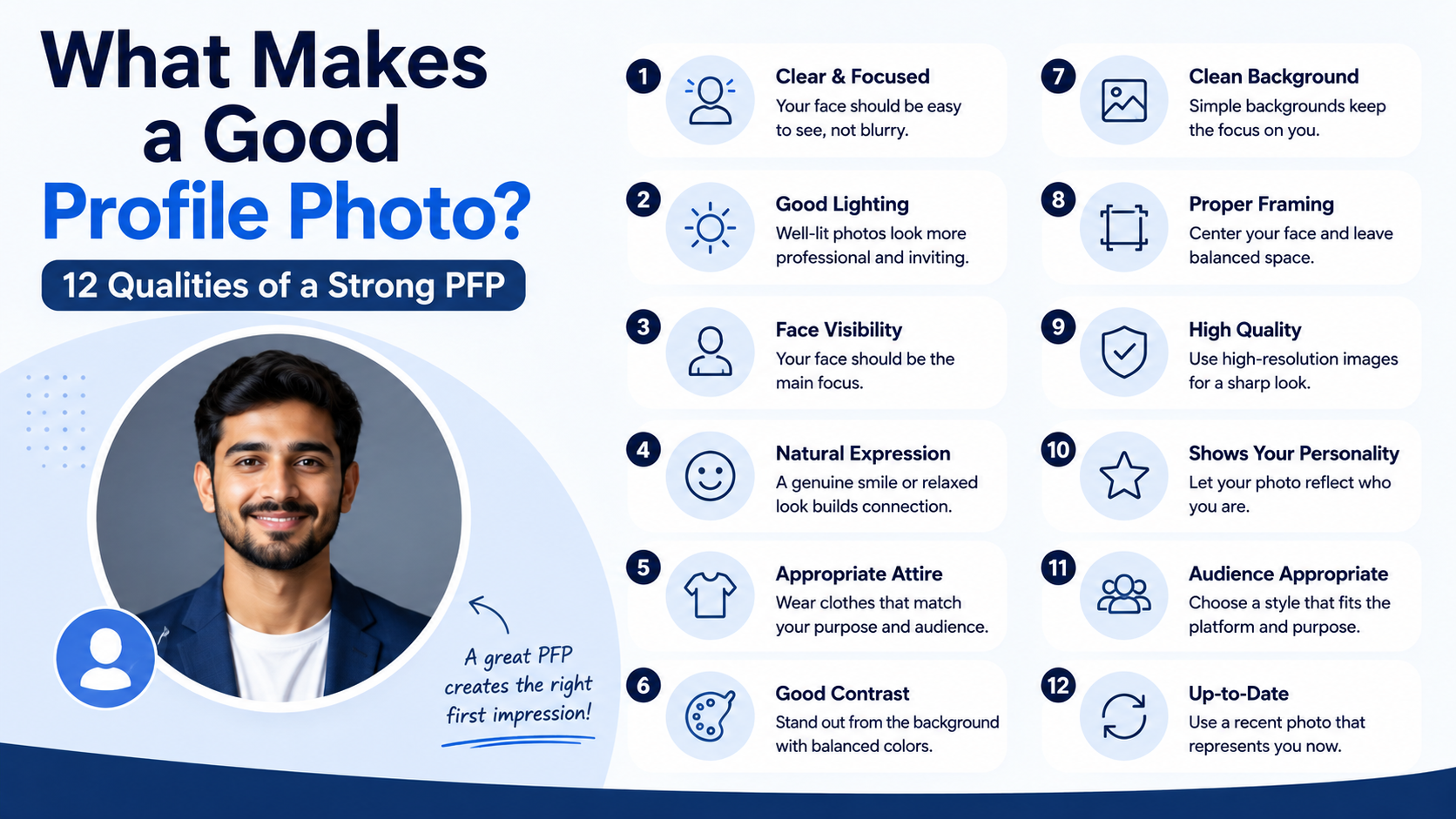
What Makes a Good Profile Photo? 12 Qualities of a Strong PFP
On this page
- 1. A Good Profile Photo Is Clear and Recognizable
- 2. Strong Lighting Makes You Look More Credible
- 3. Composition Helps Your PFP Stand Out
- 4. Your Expression Should Match Your Goal
- 5. Authenticity Is More Powerful Than Perfection
- 6. Style and Clothing Should Support Your Message
- 7. Consistency Builds a Stronger Personal Brand
- 8. Test Your Photo Before Publishing It
- Frequently Asked Questions
- Conclusion
What Makes a Good Profile Photo? 12 Qualities of a Strong PFP
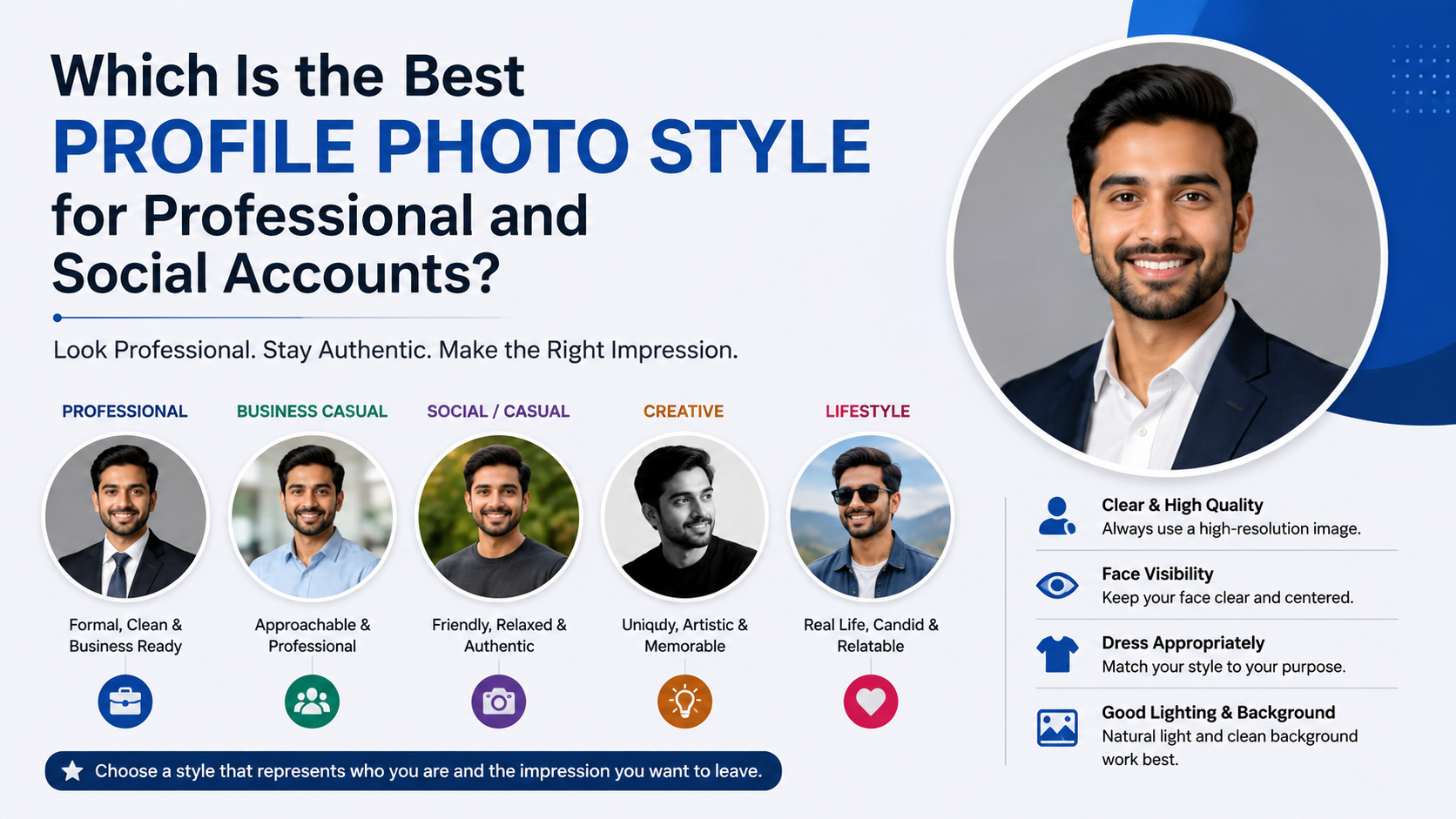
Your profile photo is often your first introduction before anyone reads your bio, message, résumé, or portfolio. Whether it appears on LinkedIn, Instagram, a company website, a dating app, or a community forum, it silently communicates who you are and whether you seem approachable, credible, and memorable.
A good profile photo does not need to look overly polished or expensive. It needs to be intentional. The strongest PFPs make it easy to recognize you, match the platform’s expectations, and reflect the impression you want to leave.
Key Takeaways
- Use a recent, clear image where your face is easy to recognize at a small size.
- Choose lighting, framing, and background elements that keep attention on you.
- Match your expression, clothing, and style to the platform and your purpose.
- Prioritize authenticity over heavy filters, excessive editing, or generic stock-like poses.
- Review how your photo appears when cropped into a circle or viewed on a mobile device.
1. A Good Profile Photo Is Clear and Recognizable
The first job of a profile photo is simple: people should immediately know who they are looking at. This matters because most platforms display profile images as small circles or thumbnails.
1. Use a High-Resolution Image
A blurry or pixelated photo can make even an otherwise strong image feel rushed. Use the original image file whenever possible instead of a screenshot, compressed social-media download, or image copied from a group photo.
A clear image should have:
- A sharp face and eyes
- Enough resolution for cropping
- Minimal visual noise or motion blur
- Natural detail without over-sharpening
For example, a crisp smartphone portrait taken in daylight will usually perform better than an old, low-quality vacation photo.
2. Make Your Face the Main Subject
Your face should occupy a meaningful portion of the frame. If someone needs to zoom in to identify you, the photo is not doing its job.
A reliable rule is to use a head-and-shoulders crop, with your face taking up roughly 50% to 70% of the image. This is especially effective for professional platforms, video-conferencing profiles, and online communities.
2. Strong Lighting Makes You Look More Credible
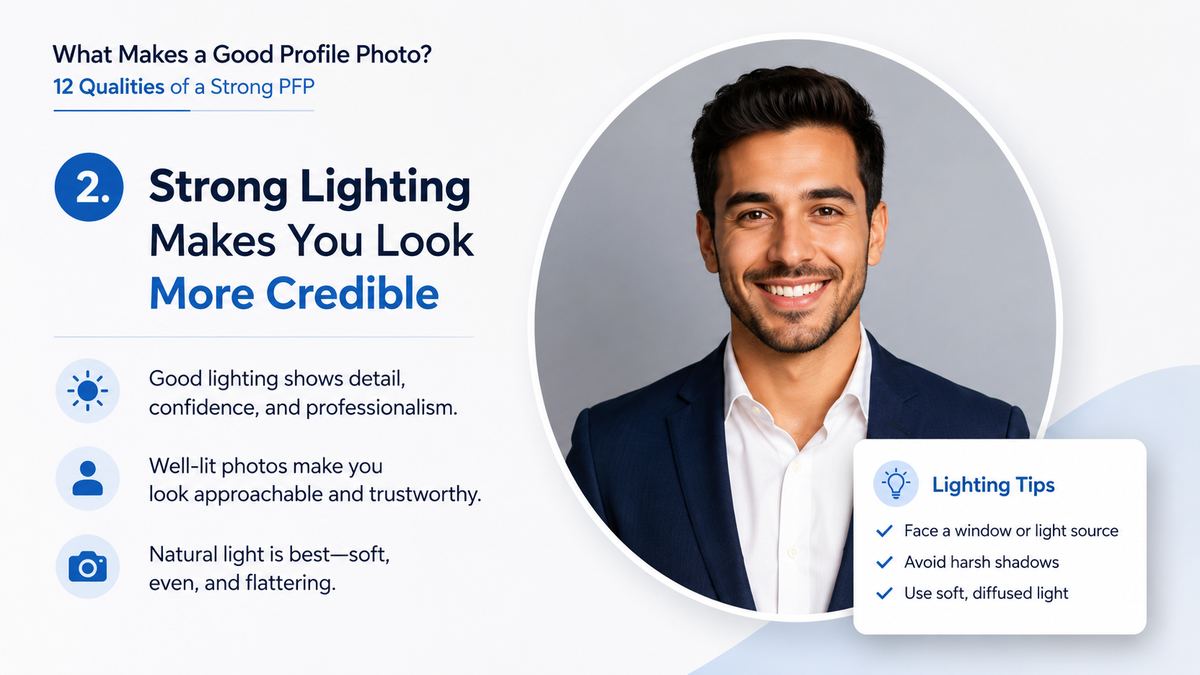
Lighting influences how healthy, approachable, and professional you appear. Poor lighting can create harsh shadows, obscure your features, or make the image feel uninviting.
3. Choose Soft, Even Light
Natural window light is one of the easiest ways to create a flattering profile photo. Face a window during the day so light falls evenly across your face. Outdoor shade can work well, too, because it avoids strong sun shadows.
Avoid:
- Bright light directly behind you
- Harsh overhead lighting
- Dark rooms with a single lamp
- Flash-heavy photos that create red eyes or shiny skin
For instance, standing a few feet from a large window with a neutral background can create a polished photo without any professional equipment.
4. Keep the Color Balance Natural
A good profile photo should look like you in real life. Extremely warm, cool, or tinted lighting can make skin tones appear unnatural and distract from your expression.
Before uploading, check whether the image has a noticeable orange, blue, green, or gray cast. A light edit to correct brightness and color is useful; dramatic filtering is usually not.
3. Composition Helps Your PFP Stand Out
Composition refers to how the elements in your photo are arranged. Good composition directs the viewer’s attention to your face rather than competing details.
5. Use a Simple, Uncluttered Background
A busy background can make your profile image confusing at a small size. Choose something that supports the overall mood without pulling focus away from you.
Good choices include:
- A plain wall
- A softly blurred outdoor setting
- A tidy office or workspace
- A background related to your field, used subtly
A graphic designer might use a clean studio backdrop with a hint of color, while a real-estate professional may choose a bright, modern office setting. In both cases, the person—not the scenery—should remain central.
6. Frame Yourself for the Platform’s Crop
Many platforms automatically crop profile photos into a circle. Important parts of your image can disappear if you place your face too close to the edge.
Leave some space around your head and shoulders, then preview the circular crop before publishing. Keep your eyes and face near the center of the frame, where they will remain visible across different devices.
4. Your Expression Should Match Your Goal
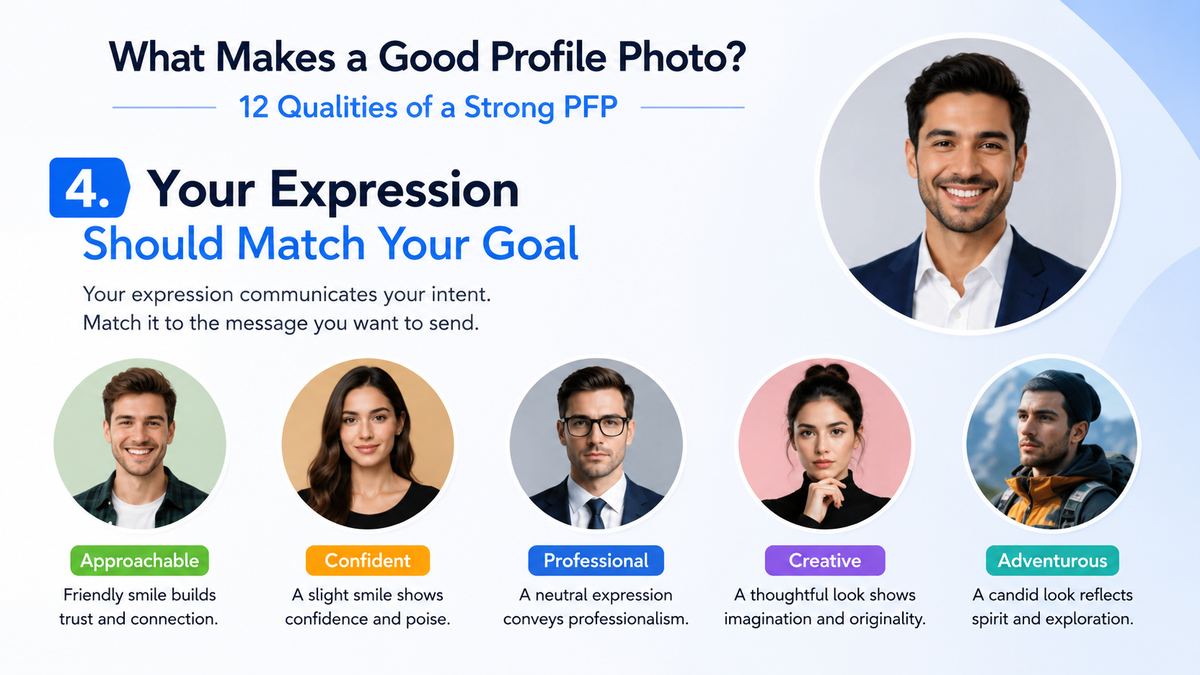
A profile photo is emotional communication. Before someone reads a word, they may form an impression based on your facial expression, posture, and eye contact.
7. Look Approachable and Confident
For most personal and professional uses, a relaxed, genuine expression works best. A small natural smile can make you seem more open, trustworthy, and easy to engage with.
That does not mean every photo must show a broad grin. A calm, confident expression may be more suitable for a lawyer, executive, artist, or technical specialist. The key is that your expression should feel intentional rather than stiff or disengaged.
8. Create Connection Through Eye Contact
Looking toward the camera often creates the strongest sense of direct connection. It helps the viewer feel as though you are present and engaged.
If direct eye contact feels unnatural, try looking just beside the lens while keeping your face forward. Avoid photos where you are looking far away, wearing dark sunglasses, or partly turned from the camera unless the platform is highly casual or creative.
5. Authenticity Is More Powerful Than Perfection
The best profile photos are polished enough to show care but natural enough to feel believable. Over-editing can reduce trust, particularly in professional settings.
9. Use Recent Photos That Reflect You Now
Your profile photo should represent your current appearance. Using a photo from many years ago may create awkwardness when you meet someone in person or join a video call.
Update your image after major changes such as:
- A substantial hairstyle or facial-hair change
- A new professional role or brand direction
- A major shift in your public-facing style
- Several years passing since the last photo
A recent photo signals that you are active, current, and attentive to your online presence.
10. Edit Lightly and Avoid Misleading Filters
Basic adjustments—such as cropping, straightening, improving exposure, and correcting color—can enhance a profile photo. But excessive skin smoothing, face reshaping, and dramatic filters can make an image look artificial.
Think of editing as refinement, not transformation. If a coworker or friend would struggle to recognize you, the image has likely been edited too heavily.
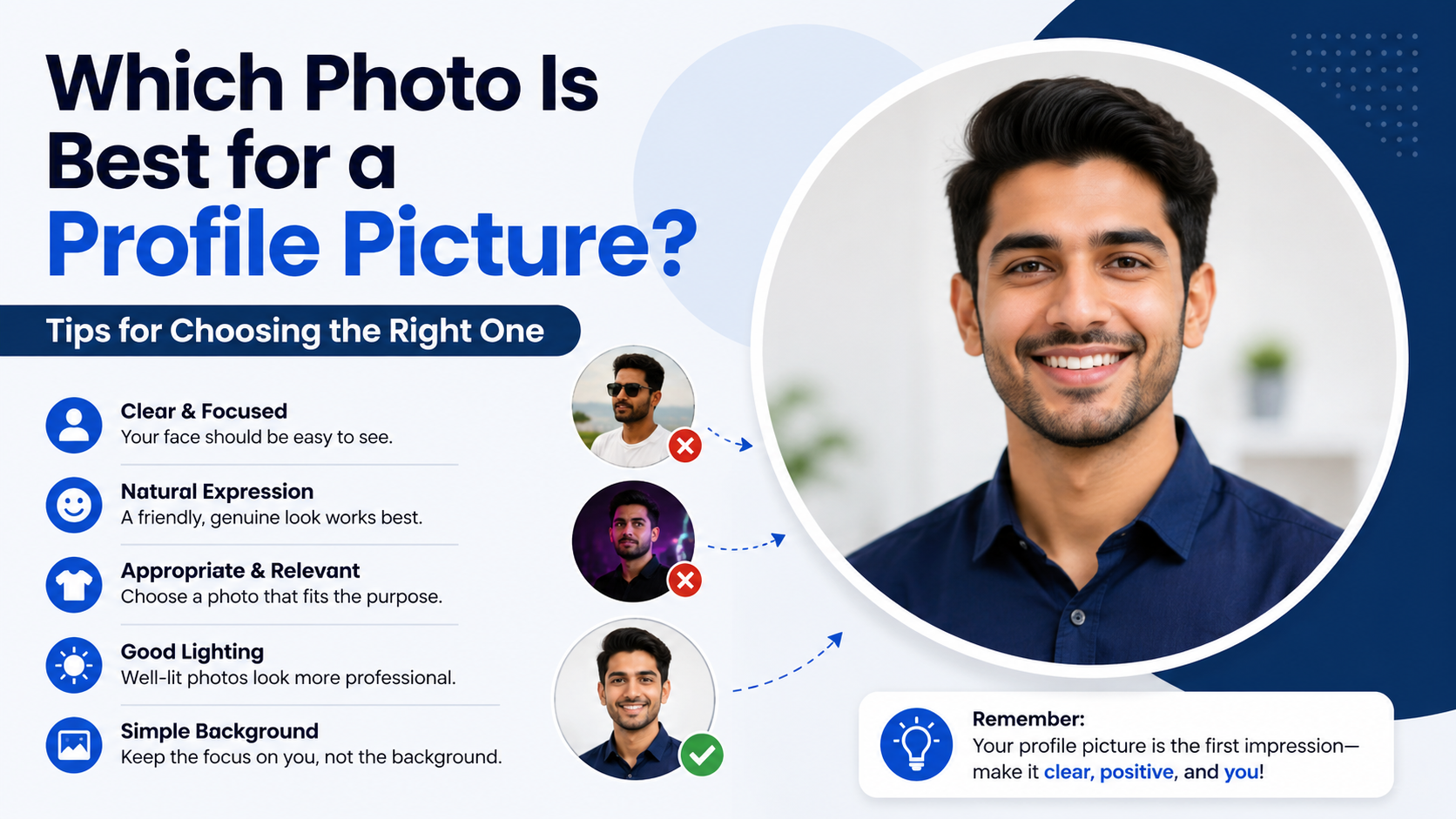

6. Style and Clothing Should Support Your Message
What you wear in a profile photo influences how people interpret your role, personality, and level of professionalism. The right choice depends on context.
11. Dress for the Audience and Platform
A good profile photo for LinkedIn may call for business-casual or industry-appropriate clothing. A creative portfolio can support more personal style. A social profile may be more relaxed while still remaining clear and flattering.
Consider the expectation of the space:
- LinkedIn: Clean, professional, and role-appropriate
- Company website: Consistent with your organization’s brand
- Creative portfolio: Distinctive but not distracting
- Social media: Personal, current, and recognizable
- Community platforms: Friendly and clear, even if casual
You do not need formal business attire for every professional photo. A developer in a plain, well-fitting shirt or a photographer in a smart casual outfit can look entirely credible when the overall image is clean and confident.
12. Use Colors That Keep Attention on Your Face
Solid colors often work better than loud patterns, large logos, or distracting graphics. Choose clothing that contrasts gently with the background so you do not blend into it.
For example, a dark navy shirt against a pale background can create a clean, balanced portrait. Avoid wearing the exact same color as the wall behind you.
7. Consistency Builds a Stronger Personal Brand
If you use several online platforms, your profile photo can help people recognize you across them. Consistency is particularly valuable for freelancers, job seekers, creators, business owners, and professionals who network online.
Use the Same Core Photo Across Key Platforms
You do not need to use the identical crop everywhere, but using the same recent photo or a closely related set of images makes your online presence easier to connect.
Consider keeping a consistent profile image on:
- Your professional website
- Email or Slack account
- Industry communities
- Speaker profiles
- Business social-media pages
If a potential client sees your LinkedIn profile, portfolio, and event bio, visual consistency reinforces that all three belong to the same person.
Refresh Without Losing Recognition
When updating your photo, retain some familiar elements if you have an established audience. Similar lighting, color palette, or overall style can make the transition feel seamless while keeping your image current.
8. Test Your Photo Before Publishing It
A profile photo can look excellent at full size but fail when reduced to a tiny icon. Testing helps you catch issues before the image becomes part of your public identity.
Check the Thumbnail Version
Reduce the image size or upload it privately to see how it appears as a small circle. Ask yourself:
- Can I clearly see my face?
- Are my eyes visible?
- Does the background compete with me?
- Is the crop balanced?
- Does the image look professional enough for its purpose?
If the answer to any of these is no, try a tighter crop or choose another image.
Get Objective Feedback
It can be difficult to judge your own photo. Ask one or two trusted people for feedback, especially if the image will be used for job searching, client outreach, or public speaking.
A useful question is: “What impression does this photo give you in the first few seconds?” Their answer may reveal whether your image communicates confidence, warmth, creativity, expertise, or something unintended.
Frequently Asked Questions
What makes a good profile photo for professional use?
A good professional profile photo is recent, well-lit, clear, and appropriately styled for your industry. Use a head-and-shoulders crop, a simple background, and a confident expression. The goal is not to look overly formal—it is to look competent, approachable, and easy to recognize.
Should I smile in my profile photo?
Usually, yes. A natural smile often makes you appear more open and trustworthy. However, the best expression depends on your personal brand and field. A subtle smile or calm, engaged expression can work equally well when it feels genuine.
Can I use a selfie as a profile photo?
You can, but it should not look like an accidental selfie. Avoid extreme angles, bathroom mirrors, visible arms, cluttered backgrounds, and harsh filters. A timer, tripod, or help from another person can produce a more polished result with minimal effort.
How often should I update my profile photo?
Update it whenever it no longer reflects your current appearance or professional identity. For most people, refreshing a professional photo every one to three years is reasonable. Update sooner if you make a major change in appearance, role, or branding.
Is a group photo ever a good profile photo?
Generally, no. Even if you crop it, group photos often leave awkward framing, inconsistent quality, or visual confusion. Use an image where you are clearly the only subject whenever possible.
Conclusion
A good profile photo is clear, current, well-lit, and authentic. It places your face at the center, uses thoughtful composition, and matches the audience you want to reach. The strongest PFP is not necessarily the most glamorous one—it is the one that helps people recognize you, trust you, and remember you.
Review your current profile photo with these 12 qualities in mind, then update it with an image that reflects who you are and where you want your online presence to take you.