August 19, 2026 · 12 min read
Which Photo Is Best for a Profile Picture? Tips for Choosing the Right One
On this page
- Start With the Purpose of Your Profile Picture
- Choose a Recent, High-Quality Image
- Make Your Face Easy to See
- Use Flattering Light and a Clean Background
- Choose an Expression That Matches Your Goal
- Dress for the Context Without Overthinking It
- Edit Lightly and Keep the Photo Authentic
- Compare Options Before You Commit
- Frequently Asked Questions
- Conclusion
Which Photo Is Best for a Profile Picture? Tips for Choosing the Right One
Your profile picture often makes an impression before anyone reads your bio, résumé, caption, or message. Whether it appears on LinkedIn, Instagram, a company website, a messaging app, or a dating profile, the right image signals confidence, approachability, and credibility within seconds.
The best profile picture is not necessarily the most polished or expensive photo. It is the one that clearly represents you, suits the platform, and helps viewers feel they can trust and recognize you. A great choice balances quality with personality—professional enough for the context, but natural enough to feel real.
Key Takeaways
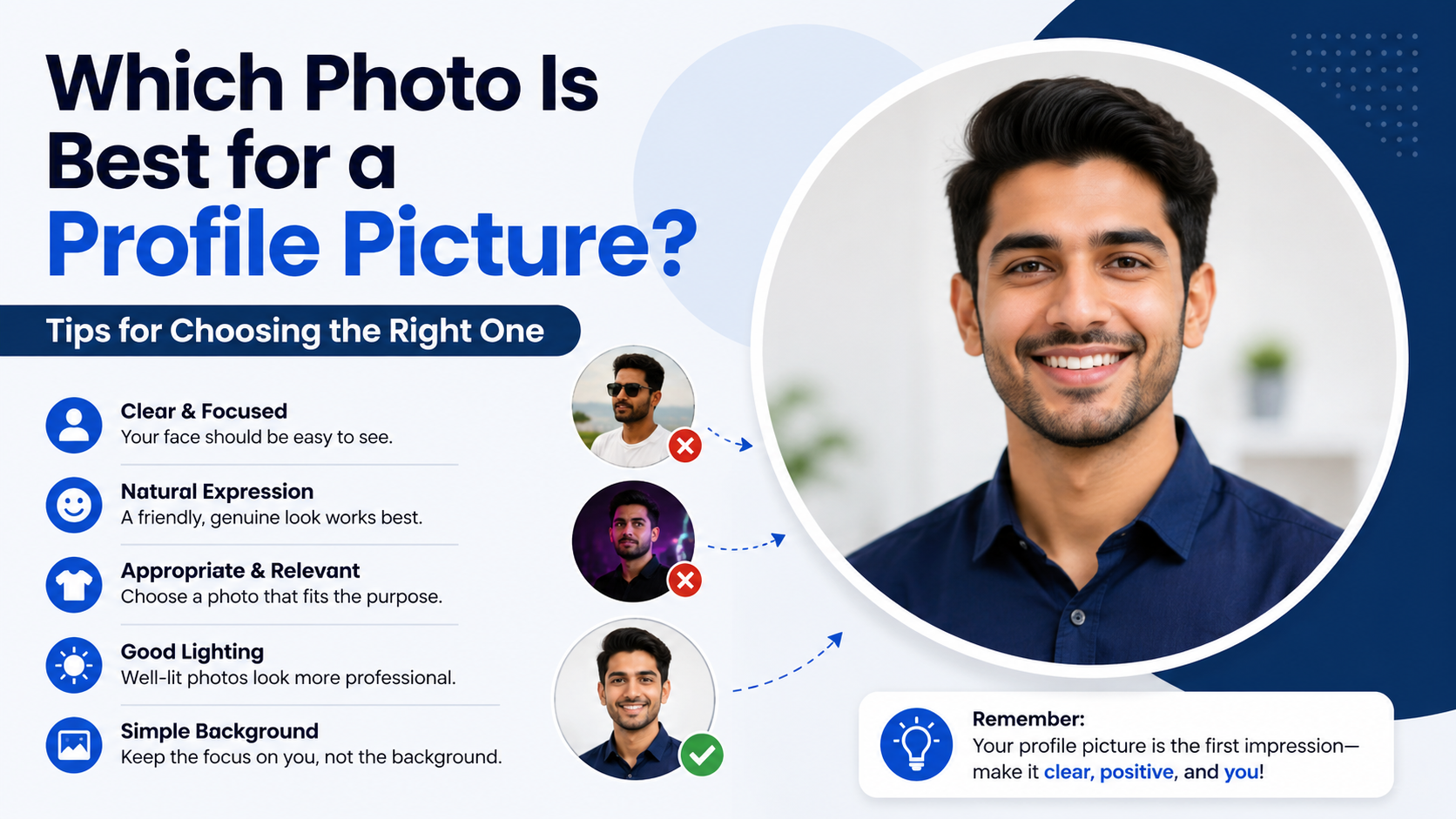
- Use a recent, high-resolution photo where your face is easy to recognize.
- Match your outfit, expression, and background to the platform and audience.
- Prioritize flattering natural light and a clean, uncluttered background.
- Make your face the focal point; avoid distant group shots and heavy filters.
- Choose a genuine expression that communicates warmth, confidence, or both.
- Test a few options and ask trusted people which image feels most like you.
Start With the Purpose of Your Profile Picture
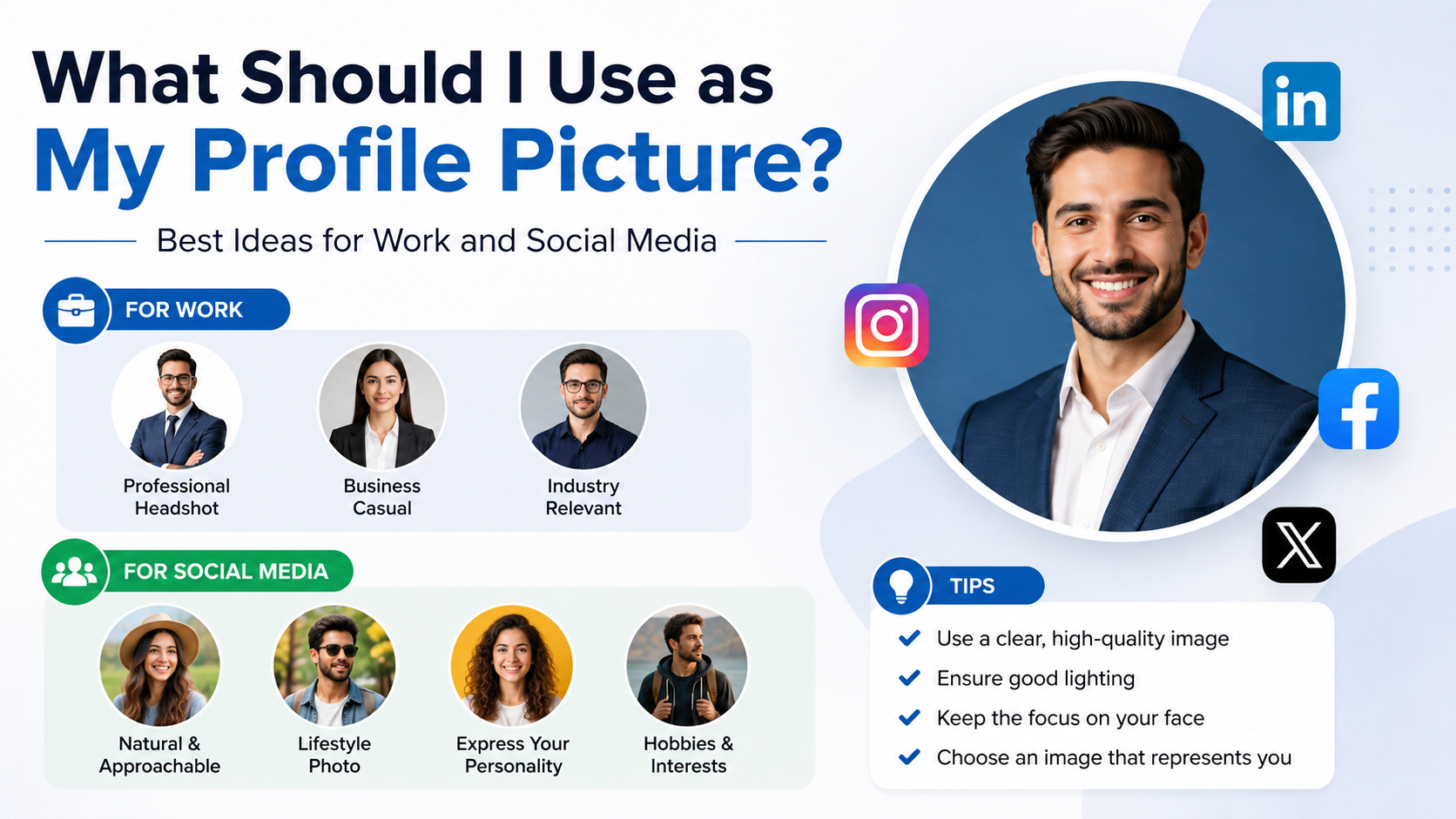
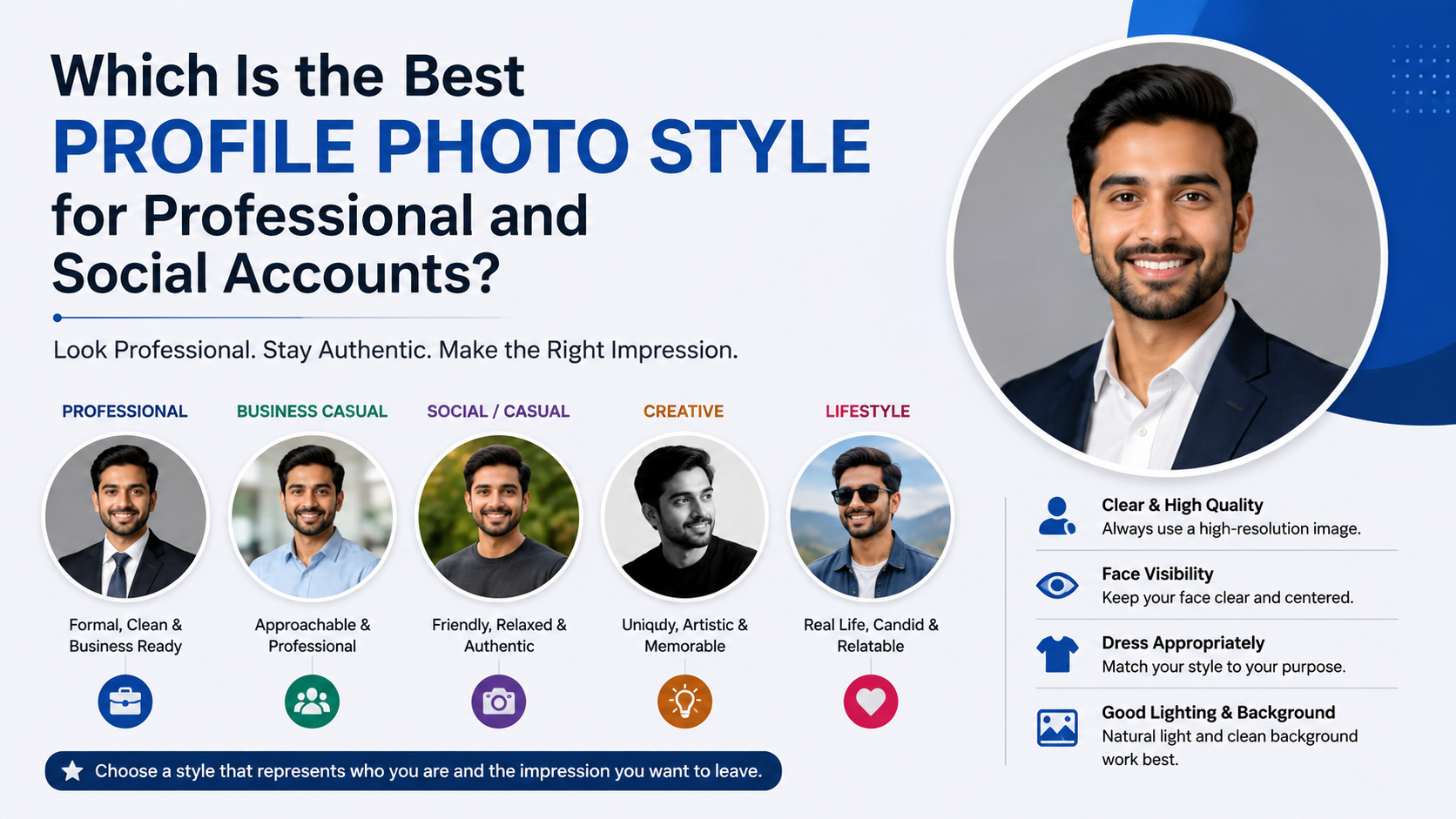
The best profile picture depends on where people will see it and what you want it to accomplish. A photo that works brilliantly for a creative Instagram account may be too casual for a professional networking profile. Before selecting an image, consider the platform, the audience, and the impression you want to make.
Professional Platforms: Credibility and Approachability
For LinkedIn, company directories, portfolio websites, and industry communities, your image should make you appear competent, current, and easy to work with. You do not need a stiff corporate headshot, but the photo should look intentional.
Aim for:
- A clear head-and-shoulders composition
- Smart casual or work-appropriate clothing
- Good lighting and a simple background
- A relaxed, confident expression
- Minimal visual distractions
For example, a marketing consultant might use a bright portrait wearing a solid-color shirt against a softly blurred office or outdoor background. That feels professional without looking overly formal.
Social Media: Personality and Recognition
On Instagram, Facebook, TikTok, X, or personal communities, you have more freedom to show your personality. Still, your face should remain recognizable, especially when the image appears as a small circular icon.
A good social profile picture might show you hiking, creating art, playing music, or attending an event—provided your face is visible. If the purpose is to connect with friends, followers, or a community, choose a photo that reflects the version of yourself you want people to associate with your account.
Dating Profiles: Honesty and Warmth
For dating apps, your main profile photo should be recent, clear, and unmistakably you. Avoid using sunglasses, group photos, heavy editing, or images from years ago. The goal is not to create a flawless version of yourself; it is to encourage a good real-world connection.
A natural smile, eye contact, and a well-lit photo usually outperform dramatic poses or overly edited selfies.
Choose a Recent, High-Quality Image
A technically strong photo does not require professional equipment, but it should be sharp, well-lit, and current. Grainy, dark, outdated, or heavily compressed images can make a profile feel neglected.
Use a Photo That Looks Like You Today
Your photo should be recent enough that someone could recognize you easily in person. If your hair, glasses, facial hair, style, or appearance has changed significantly, update your image.
As a practical guideline, refresh your profile picture every one to two years—or sooner after a major change in appearance or career direction.
Prioritize Resolution and Sharpness
A blurry photo can look unprofessional even if the composition is otherwise excellent. Use the original image file whenever possible instead of a screenshot, image downloaded from a social platform, or cropped group photo.
Check that:
- Your eyes and face are in focus
- The image is not pixelated when cropped
- The photo remains clear at small sizes
- Your face is not obscured by shadows or motion blur
A phone camera can produce an excellent result when used in good lighting. Modern smartphones are more than capable of creating a strong profile image.
Make Your Face Easy to See
Profile pictures are often displayed in tiny circles or squares. An image may look great full-screen but fail when reduced to thumbnail size. The best profile picture keeps your face central and visible.
Use a Head-and-Shoulders Crop
For most professional and general-purpose profiles, a head-and-shoulders photo is the safest choice. Your face should take up a meaningful portion of the frame—typically around 50% to 70%.
Avoid photos where you are standing far away, sitting at the end of a table, or surrounded by scenery. A beautiful travel photo may be worth posting elsewhere, but it is rarely ideal as the main profile image.
Account for Circular Cropping
Many platforms automatically crop profile photos into circles. Before uploading, make sure important features are not near the edges. Leave enough space above your head and around your shoulders so the crop does not cut off part of your face.
A simple test: reduce the image on your phone until it is thumbnail-sized. If you cannot immediately identify yourself, choose a tighter crop.
Avoid Group Photos as Your Main Image
A group photo makes viewers work to figure out which person you are. On dating apps, it can create confusion; on professional platforms, it can look unfocused.
If you love a group image, use it as a secondary photo in a gallery. Your main profile picture should feature you alone.
Use Flattering Light and a Clean Background
Lighting changes how friendly, energetic, and polished you appear. It can also make the difference between an ordinary image and one that immediately catches attention.
Favor Soft, Natural Light
Natural daylight is often the easiest and most flattering choice. Stand facing a window or take a photo outdoors during the early morning or late afternoon. This creates soft, even light across your face.
Avoid harsh overhead lighting, direct midday sun, and strong backlighting. These can create deep shadows, squinting, or a silhouette effect that hides your features.
Keep the Background Intentional
Your background should support the photo, not compete with it. Neutral walls, softly blurred outdoor settings, offices, cafés, or clean home spaces can work well.
Avoid backgrounds with:
- Messy rooms or visible clutter
- Distracting signs, strangers, or busy crowds
- Strong patterns that draw attention away from you
- Private information, such as addresses or workplace documents
For a professional profile, a muted wall, bookcase, or softly blurred workplace often works well. For a casual account, a bright outdoor background can add personality while keeping the focus on your face.
Create Separation From the Background
If possible, wear clothing that contrasts gently with the background. For example, a dark blue shirt may stand out nicely against a light gray wall. This helps your face and shoulders remain distinct when the image is viewed at a small size.
Choose an Expression That Matches Your Goal
Your facial expression communicates immediately. People tend to respond positively to images that look open, calm, and genuine.
A Natural Smile Usually Works Best
A relaxed smile can make you look approachable, trustworthy, and confident. It does not need to be a broad grin; even a slight, natural smile can create warmth.
If smiling feels awkward, think of a pleasant conversation or have someone take several photos while you move and talk naturally. The best shot is often captured between posed moments.
Use Eye Contact Thoughtfully
Looking directly at the camera creates a sense of connection and confidence. It is especially useful for LinkedIn, business profiles, and dating apps.
Looking slightly away can work for more creative or editorial-style images, but it may feel less personal. If your primary goal is trust and approachability, direct eye contact is usually the stronger option.
Avoid Overly Serious or Forced Poses
A stern expression can be appropriate in certain creative, executive, or artistic contexts, but it may unintentionally make you seem unapproachable. Similarly, an exaggerated smile or rigid pose can feel inauthentic.
The goal is not to look perfect. The goal is to look like your best real self.
Dress for the Context Without Overthinking It
Your clothing should align with the environment where the photo will appear. It should also make you feel comfortable and confident.
Keep Professional Outfits Simple
For a work-related profile, choose clothing you might reasonably wear when meeting a client, colleague, or hiring manager in your field. You do not always need a suit; a clean shirt, blouse, sweater, blazer, or polished casual outfit is often enough.
Solid colors tend to photograph well because they keep attention on your face. Blues, greens, burgundy, charcoal, and neutral tones are usually safe choices.
Let Personal Style Show in Casual Spaces
For social platforms, your clothing can reveal more personality. A favorite jacket, hobby-related outfit, or distinctive accessory can make the image memorable—provided it does not overwhelm the photo.
For example, a ceramic artist might wear a simple apron in a bright studio portrait. That immediately communicates their work while still keeping their face visible.
Avoid Distracting Logos and Busy Patterns
Large logos, slogan-heavy shirts, and intense patterns can date a photo quickly or shift attention away from you. If your goal is a versatile image you can use across multiple platforms, simple clothing is the most adaptable option.
Edit Lightly and Keep the Photo Authentic
Editing can improve brightness, crop, and color balance. However, excessive filters or retouching can make a profile picture feel misleading or artificial.
Make Small, Useful Adjustments
Good edits include:
- Cropping for better framing
- Slightly increasing brightness or exposure
- Correcting color temperature
- Reducing distracting background elements
- Straightening the image
These adjustments help the photo look clear and polished without changing who you are.
Skip Heavy Filters and Face-Altering Effects
Filters that dramatically smooth skin, alter facial structure, change eye color, or reshape your body can reduce trust. They may also create an uncomfortable disconnect when people meet you offline.
For professional use, keep edits especially restrained. A clean, realistic image ages better and communicates confidence.
Consider Accessibility and Inclusivity
Strong contrast, a clear face, and an uncluttered composition help more people recognize and engage with your image. Avoid overly dark images or styles that obscure your face. Clear visual communication benefits everyone, including viewers using smaller screens or assistive technology.
Compare Options Before You Commit
Choosing the best profile picture is easier when you compare a small group of strong candidates instead of endlessly searching through every photo you own.
Narrow It Down to Three to Five Photos
Select several images that meet the basic requirements: recent, clear, well-lit, and appropriate for the platform. Then compare them side by side.
Ask:
- Which photo makes my face easiest to recognize?
- Which one best fits the platform?
- Which expression feels most natural?
- Which image would I trust if I saw it on someone else’s profile?
- Does this photo still work when shown as a small circle?
Get Feedback From the Right People
Ask two or three trusted friends, colleagues, or mentors for honest input. Give them context rather than asking only, “Which one is best?”
For instance, ask, “Which image makes me seem most approachable for a client-facing LinkedIn profile?” Their responses will be more useful because they can evaluate the photo against your real goal.
Update for New Goals
Your best profile picture may change as your life changes. A freelancer launching a business, a graduate entering the job market, or a creator building a public audience may need a different image than they used previously.
Treat your profile picture as part of your personal presence, not a permanent decision.
Frequently Asked Questions
Should my best profile picture be a selfie?
A selfie can work, especially for casual social media, as long as it is well-lit, sharp, and natural. For professional platforms, a photo taken by someone else often looks more polished because it creates better framing and avoids the close-up angle common with front-facing cameras. If you use a selfie, avoid extreme angles, visible arm positioning, bathroom mirrors, and distracting backgrounds.
What is the best color to wear in a profile picture?
Solid colors that complement your skin tone and contrast with the background are usually the best choice. Blue, green, burgundy, navy, gray, and soft neutral tones tend to work well. The most important factor is that the color does not wash you out or distract from your face. Choose something you feel confident wearing.
Should I use the same profile picture on every platform?
Using the same or a closely related photo across major platforms can improve recognition and strengthen your personal brand. However, it is reasonable to adapt the image for each context. You might use a polished headshot on LinkedIn, a slightly more relaxed version on Instagram, and a different but equally current image on a dating profile.
Is it okay to wear sunglasses in a profile picture?
Sunglasses are usually a poor choice for a main profile image because they hide your eyes, which are important for recognition and connection. They can work as a secondary lifestyle photo, especially on casual or travel-focused accounts, but choose a clear-eyed image as your primary picture whenever possible.
How often should I update my profile picture?
Update your photo whenever it no longer reflects your current appearance or professional identity. For most people, every one to two years is a reasonable schedule. You may want to update sooner after changing careers, launching a business, significantly changing your appearance, or improving the quality of your existing photo.
Conclusion
The best profile picture is clear, current, well-lit, and appropriate for the place where people will see it. Put your face front and center, choose a genuine expression, use a simple background, and dress in a way that supports the impression you want to make.
Do not wait for a “perfect” photo. Choose the strongest recent image you have, test how it looks at thumbnail size, and ask a few trusted people for feedback. Then upload it with confidence—because a thoughtful profile picture is one of the simplest ways to make every online introduction stronger.
Advertisement