August 19, 2026 · 12 min read
Profile Photograph vs Profile Picture: What Is the Difference?
On this page
- What Is a Profile Photograph?
- What Is a Profile Picture?
- Profile Photograph vs Profile Picture: The Core Differences
- When to Use a Profile Photograph
- When a Profile Picture Is the Better Choice
- How to Create an Effective Profile Photograph
- Technical Requirements and Common Mistakes
- Privacy, Accessibility, and Image Etiquette
- Frequently Asked Questions
- Conclusion
Profile Photograph vs Profile Picture: What Is the Difference?
Your online image often speaks before you do. Whether someone finds you on LinkedIn, opens your company bio, joins a video call, or views your social profile, the visual attached to your name shapes their first impression.
The terms profile photograph and profile picture are frequently used interchangeably, but they do not always mean the same thing. A profile photograph typically implies a purposeful, recognizable image of a person, while a profile picture can be almost any image used to represent an account—including a logo, avatar, pet, illustration, or landscape.
Understanding the distinction helps you select the right image for the platform, audience, and outcome you want.
Key Takeaways
- Use a profile photograph when recognition, credibility, and human connection matter.
- A profile picture is broader and may be a photo, avatar, logo, or other visual identity.
- Professional platforms usually benefit from a clear, current head-and-shoulders photograph.
- Social and community platforms often allow more personality and creative freedom.
- Keep your image consistent across major professional channels to improve recognition.
- Review privacy, image quality, and platform-specific requirements before uploading.
What Is a Profile Photograph?
A profile photograph is a photo intended to identify and represent a specific person on a digital platform. It is usually a clear portrait, often showing the face and shoulders, and is designed to make the person recognizable.
The purpose of a profile photograph
The central purpose is identification. A strong profile photograph lets people quickly connect a name, message, résumé, or account with a real person.
It can also communicate qualities such as:
- Professionalism
- Approachability
- Confidence
- Personal style
- Relevance to a role or industry
For example, a consultant’s profile photograph on LinkedIn may feature neutral clothing, direct eye contact, and a clean background. That image supports the expectation that the person is credible and easy to identify in a business context.
Common characteristics
Most effective profile photographs share a few features:
- The person’s face is visible and well lit.
- The image is recent enough to reflect their current appearance.
- The framing works at small sizes.
- The background is not distracting.
- The expression fits the audience and platform.
A profile photograph does not need to be taken in a studio. A high-quality smartphone image with natural light, good composition, and a simple background can be highly effective.
What Is a Profile Picture?
A profile picture is the broader term. It refers to any image chosen to represent an account, identity, brand, or user on a website, app, or social network.
A profile photograph is therefore one type of profile picture—but not every profile picture is a photograph.
Profile pictures can take many forms
Depending on the platform, a profile picture may be:
- A personal headshot
- A casual selfie
- A company logo
- A cartoon avatar
- A stylized illustration
- A favorite object, pet, or hobby image
- An abstract design or icon
For instance, a small business may use its logo as its Instagram profile picture, while the founder uses a professional portrait on LinkedIn. Both images are profile pictures, but only the founder’s image is a profile photograph.
Why the broader term matters
Calling every account image a profile photograph can create confusion. If a platform asks for a profile picture, it may permit non-photo options. If an employer, conference organizer, or client directory asks for a profile photograph, they are usually expecting a recognizable image of you.
The wording reveals the expected level of personal identification.
Profile Photograph vs Profile Picture: The Core Differences
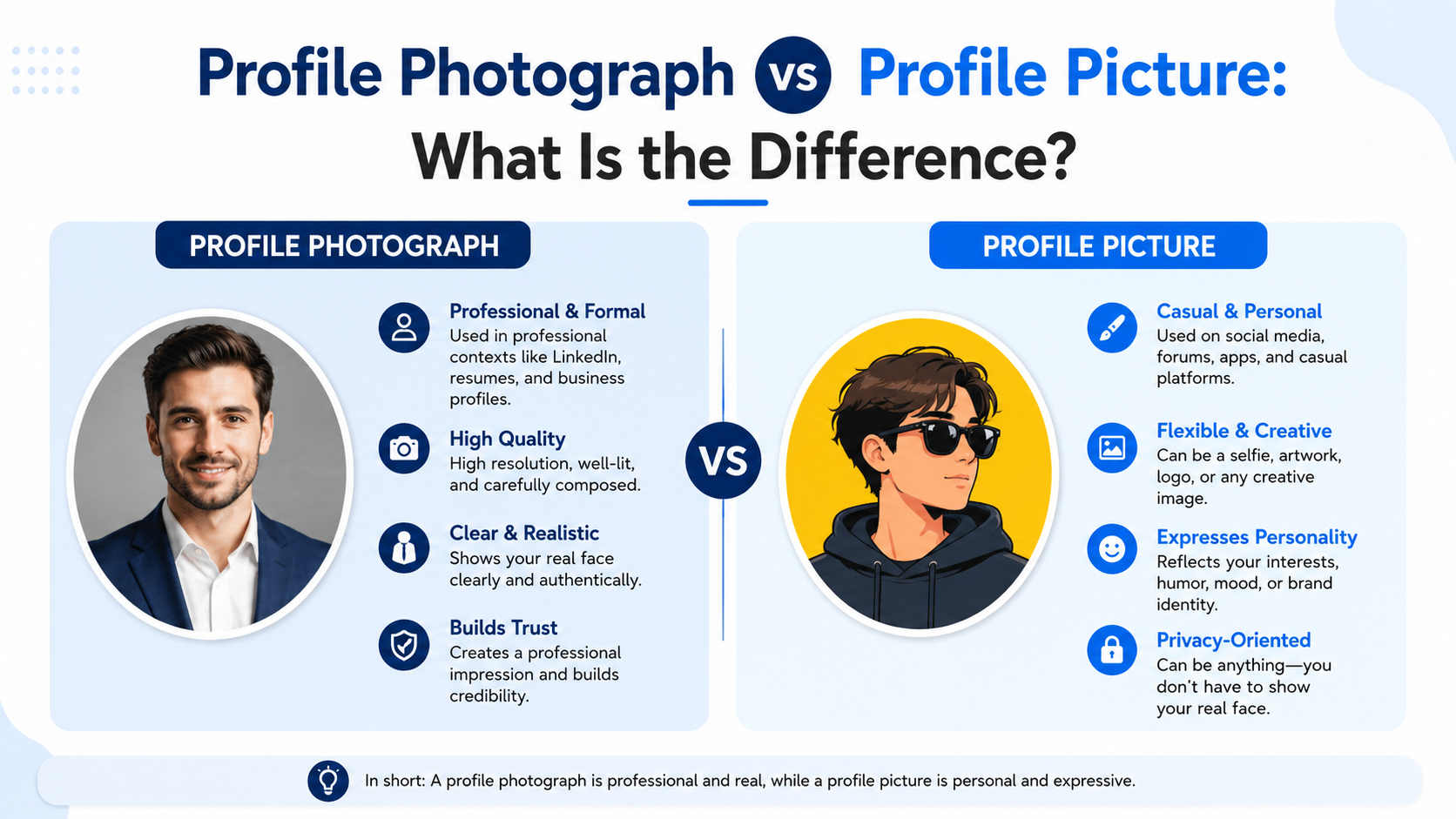
The most important difference is scope. A profile photograph is specifically a photo of a person; a profile picture is any image used as an account’s visual representation.
A quick comparison
| Feature | Profile Photograph | Profile Picture | |---|---|---| | Must show a person | Usually yes | No | | Can be a logo or avatar | No | Yes | | Main goal | Recognition and trust | Representation or branding | | Best for | LinkedIn, company bios, speaker pages | Social media, communities, brand accounts | | Typical style | Clear portrait or headshot | Portrait, logo, illustration, or icon |
Context determines the best choice
The correct choice depends less on terminology and more on what the platform requires.
Use a profile photograph when people need to know who they are communicating with. Use a profile picture when visual branding, privacy, or creative self-expression matters more than personal recognition.
For example:
- A lawyer on a firm website should use a profile photograph.
- A gaming account can use an avatar or character image.
- A nonprofit’s social media account should usually use its logo.
- A freelancer on a marketplace should use a clear, professional portrait.
- A private forum user may prefer an illustration rather than a personal image.
When to Use a Profile Photograph
A profile photograph is the better choice whenever your identity, expertise, or relationship-building ability affects the viewer’s decision.
Professional networking platforms
On LinkedIn, professional association sites, conference portals, and recruiting platforms, a real photograph is generally expected. It helps recruiters, colleagues, and prospective clients recognize you.
A good professional profile photograph should:
- Show your face clearly.
- Use recent, accurate imagery.
- Match the formality of your industry.
- Feel welcoming rather than overly staged.
- Avoid heavy filters or visual effects.
Someone working in finance, law, or executive leadership may choose a more formal portrait. A designer, photographer, or startup founder may use a more relaxed but polished image.
Client-facing and trust-based roles
If your work involves sales, consulting, healthcare, education, real estate, or coaching, your image can reduce uncertainty. People are more likely to engage when they can associate a face with the person offering advice, services, or support.
For example, a real estate agent’s website profile photograph should make it easy for prospective buyers to recognize them at a viewing. A logo alone may be useful for the agency, but it does not create the same personal connection.
Internal workplace tools
Platforms such as Slack, Microsoft Teams, and employee directories benefit from clear photographs, especially in hybrid or remote workplaces. A recognizable image can make collaboration smoother and help new colleagues learn names and faces.
When a Profile Picture Is the Better Choice
A profile picture offers greater flexibility, which can be valuable for brands, anonymous communities, or platforms centered on creativity.
Brand and organization accounts
Businesses, nonprofits, teams, and publications usually need a consistent brand image rather than a person’s portrait. A logo is often the strongest profile picture because it remains recognizable even when displayed in a small circle.
For best results:
- Use a simplified logo variation when possible.
- Ensure text remains readable at a small size.
- Leave enough padding around the mark.
- Keep colors consistent with your brand identity.
- Use the same image across key official channels.
Privacy-conscious communities
In some spaces, people may wish to protect their identity. This is especially common in support groups, gaming communities, hobby forums, and public-interest discussions.
An avatar, illustration, or abstract image can preserve privacy while still giving an account a recognizable visual identity. Choose something distinct enough that regular community members can identify your posts over time.
Casual and creative platforms
On personal social accounts, a profile picture can be more expressive. You might choose a vacation photo, artistic portrait, pet image, or stylized illustration—provided it fits how you want to be perceived.
The key is intentionality. A playful profile picture is not unprofessional by default; it simply needs to suit the setting and audience.

How to Create an Effective Profile Photograph
A professional-looking image is less about expensive equipment and more about thoughtful choices.
Focus on lighting and framing
Good lighting makes the greatest difference. Face a window or use soft, even lighting that illuminates your face without harsh shadows.
Aim for:
- A head-and-shoulders composition
- Eye-level camera positioning
- A clean or softly blurred background
- Enough space around your face for circular cropping
- Sharp focus on your eyes
Avoid images where your face occupies only a tiny portion of the frame. Profile images are often displayed at small sizes, so details disappear quickly.
Choose clothing and expression strategically
Wear clothing appropriate for the platform and your field. You do not need formal business attire everywhere, but your look should align with the expectations of your audience.
A natural smile or relaxed expression is usually effective because it signals openness. Avoid overly dramatic poses, sunglasses, group photos, or images where viewers must guess which person is you.
Keep it current and authentic
An outdated profile photograph can create an awkward in-person experience. Update your image after a major change in appearance or roughly every few years if the existing photograph no longer reflects how you look.
Authenticity matters, too. Excessive retouching, strong filters, or AI edits that significantly alter your appearance can undermine trust when people meet you.
Technical Requirements and Common Mistakes
Even a great image can fail if it is poorly prepared for the platform.
Use the right format and resolution
Most platforms accept JPG or PNG files. A square image is generally safest because profile picture containers are often circular or square.
Before uploading, check that:
- The image is high resolution and not pixelated.
- Your face or logo remains visible in a circular crop.
- Important details are not too close to the edges.
- The file is not unnecessarily large.
- The image has enough contrast against the platform interface.
A useful starting point is a square image of at least 800 × 800 pixels. This gives most platforms enough detail while allowing room for resizing.
Avoid these common profile image mistakes
Some errors can make an otherwise suitable profile photograph less effective:
- Using a group photo and cropping other people out
- Uploading a blurry, dark, or heavily compressed image
- Choosing an image that is more than several years old
- Using a busy background that competes with your face
- Relying on a logo where people expect to see a person
- Using a different identity across every professional platform
Consistency does not mean using the exact same image forever. It means ensuring that your profile images are recognizable enough that people can confidently identify you from one platform to another.
Privacy, Accessibility, and Image Etiquette
Your profile image is public-facing on many platforms, so consider both personal boundaries and the experience of others.
Protect your privacy
Before posting a profile photograph, think about what it reveals. Avoid photos that disclose your home address, private workplace information, children, travel details, or other sensitive background information.
If privacy is a concern, consider:
- Restricting visibility through platform settings
- Using a less revealing but still recognizable photograph
- Choosing an avatar on non-professional platforms
- Removing image metadata before sharing when appropriate
Make your profile image accessible
A visually clear profile picture helps everyone, including people who use screen readers or have low vision. Where a platform allows alt text or image descriptions, use a concise description.
For example: “Professional headshot of Jordan Lee wearing a navy blazer against a light gray background.”
Avoid descriptions that make assumptions about identity, ethnicity, gender, or disability unless that information is personally relevant and intentionally shared.
Respect platform culture
Each online space has its own norms. A formal speaker bio may call for a polished headshot, while a Discord community may value personality and creativity. Matching the environment shows awareness and makes your profile feel more appropriate.
Frequently Asked Questions
Is a profile photograph the same as a headshot?
Not always. A headshot is usually a professionally framed portrait focused on the face and shoulders. A profile photograph may be a headshot, but it can also be a more casual portrait as long as it clearly represents the person.
Can a logo be used as a profile photograph?
No. A logo can be an effective profile picture for a business or organization, but it is not a profile photograph because it does not depict a person. If a site requests a profile photograph, use a clear image of yourself.
Should I use the same profile photograph everywhere?
For professional platforms, using the same or a closely related photograph is usually helpful. It improves recognition and strengthens your personal brand. You can use a more casual or creative profile picture on personal accounts if that better fits the audience.
How often should I update my profile photograph?
Update it whenever it no longer resembles your current appearance or professional identity. For many people, reviewing it every two to three years is reasonable. Update sooner after a major change in hairstyle, glasses, role, or branding.
Is it acceptable to use an AI-generated profile picture?
It depends on the context. An AI-generated avatar may work well for a private or creative account. However, for professional profiles, directories, job applications, and client-facing pages, use a real and accurate photograph to avoid misleading people.
Conclusion
A profile photograph is a specific type of profile picture: a clear image of a person designed to support recognition and trust. A profile picture is broader, covering everything from headshots and selfies to logos and avatars.
Choose a profile photograph when your professional identity, credibility, or relationship with the audience matters. Choose a broader profile picture when representing a brand, preserving privacy, or expressing creativity is the priority. Review your current images today and make sure each one reflects the audience you want to reach.
Advertisement